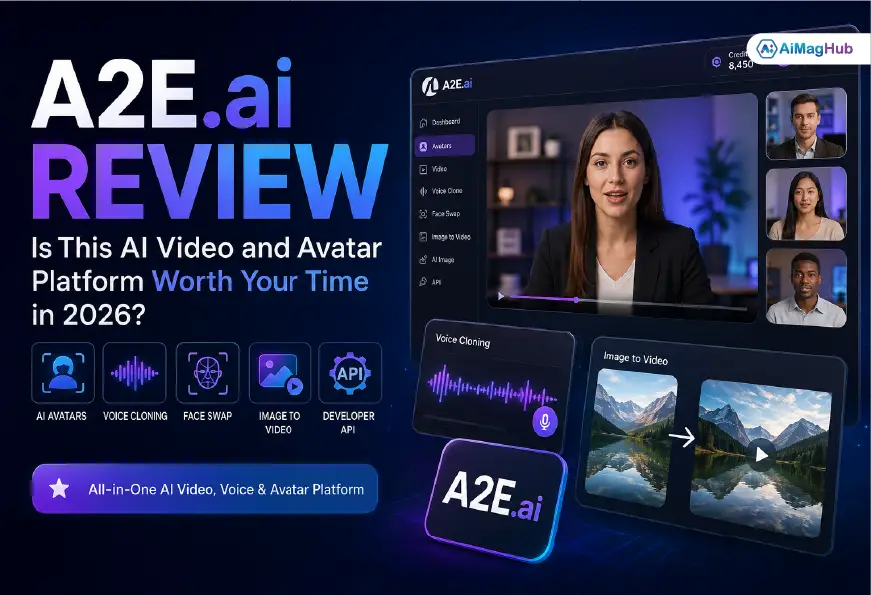
If you’ve spent any time researching AI video tools lately, you’ve probably run into A2E.ai — an all-in-one platform that lets you generate talking avatars, clone voices, swap faces, and turn a single photo into a full video without touching a camera. It’s one of those tools that seems to show up in every “best AI video generator” roundup this year, and after actually digging into it and testing it out across a few projects, I wanted to put together an honest, practical breakdown of what it does well, where it falls short, and who it’s actually built for.
This isn’t a rehashed spec sheet. It’s a working guide based on real use, competitor comparisons, and the kind of details that matter when you’re deciding whether to hand over your credit card.
What Is A2E.ai?
A2E.ai is a multi-modal AI content platform built around video, image, and voice generation. At its core, it combines several capabilities under one roof: AI avatar creation, lip-sync animation, voice cloning, face and head swap, image-to-video conversion, and a text-to-image generator. Instead of stitching together five separate tools — one for avatars, one for voice, one for lip-sync — A2E.ai tries to be the single workspace where all of that happens.
The platform positions itself as a flexible alternative to more locked-down enterprise tools like Synthesia or HeyGen, offering a credit-based pricing structure and a genuinely usable free tier that doesn’t require a credit card to try. It also gives developers direct API access, which is a big part of why agencies and SaaS teams have started plugging it into their own product workflows rather than just using it as a standalone app.
Core Features Worth Knowing
- AI Avatar & Talking Photo – Upload a portrait, add a script or audio file, and the platform animates the face with synced speech using its MultiTalk model.
- Voice Cloning – Supports over 50 languages, so you can clone a voice and generate speech in a language the original speaker never recorded in.
- Face Swap & Head Swap – Used heavily for social content, memes, and short-form video edits.
- Image-to-Video – Turns a static photo into motion, with support for consistent characters across frames.
- Multi-Model Access – A2E.ai gives you access to several underlying generation models (including Wan 2.6, and integrations with voice engines like ElevenLabs and Minimax) inside one interface, so you’re not locked into a single engine’s quirks.
- Developer API – Full API access for avatar generation, image-to-video, and text-to-image, with documentation aimed at teams building automated content pipelines.
Who Actually Uses A2E.ai?
The platform’s appeal splits pretty cleanly into a few groups:
Content Creators and Social Media Teams
YouTubers and short-form creators use it to produce talking-head videos or animated clips without filming anything. Face swap and voice clone tools also make it popular for parody content, dance videos, and quick social experiments.
Marketing and E-commerce Teams
Businesses use the platform to generate product demo videos, localized ad creatives, and even AI-generated “model” visuals for product photography — skipping traditional photoshoots entirely.
E-learning and Training Departments
Because avatars can deliver scripted content in multiple languages, A2E.ai gets used for onboarding videos, compliance training, and course content where hiring on-camera talent repeatedly isn’t practical.
Developers and SaaS Products
Teams building their own apps use the API to add avatar generation or voice synthesis directly into their product, rather than sending users to a third-party tool.
Pricing and Free Tier
A2E.ai runs on a credit system. Monthly subscription credits reset each billing cycle and don’t roll over, but credits purchased through a one-time top-up don’t expire — which is a meaningful distinction if your usage is inconsistent month to month. There’s a genuine free tier, though like most AI video platforms, expect limitations around watermarks, generation priority, and daily credit caps. If you’re testing the platform before committing, the free tier is enough to judge output quality on a couple of real projects.
Strengths and Weak Points
What stands out:
- Strong lip-sync accuracy — mouth movements and facial expressions read as natural rather than robotic, which is where a lot of competing tools still struggle.
- Genuinely wide feature set in one platform, cutting down on the need to juggle separate tools for voice, video, and avatars.
- Developer-friendly with real API documentation, not just a marketing page.
- No credit card required to start testing.
Where it falls short:
- Output quality can vary depending on which underlying model you pick, which means some trial and error before you land on consistent results.
- The credit system takes a bit of getting used to — costs are calculated per second or per asset, and it’s not always obvious upfront.
- Generation speed can lag, especially during high-demand periods; a short clip can occasionally take longer than expected.
- The interface, while functional, isn’t as polished as some higher-priced enterprise competitors.
Common Mistakes People Make With A2E.ai
- Skipping the source image quality check. Lip-sync and avatar output are only as good as the input photo — low resolution or awkward angles produce noticeably worse results.
- Not testing multiple models before committing credits. Since A2E.ai gives access to several generation engines, running the same short clip through two options before scaling up saves both credits and frustration.
- Ignoring script pacing for voice clone. Cloned voices sound most natural when the script is written the way someone actually speaks — short sentences, natural pauses — rather than dense written copy.
- Underestimating how credits burn on longer clips. Because pricing scales with duration, teams producing long-form content should map out a rough credit budget before a big production run.
Best Practices for Better Results
- Use high-resolution, front-facing photos for avatar and talking-photo projects.
- Keep scripts conversational when using voice cloning — it noticeably improves how natural the delivery sounds.
- Batch-test short samples on the free tier before committing paid credits to a full campaign.
- Pair the API with your existing content pipeline if you’re producing videos at scale — manually re-uploading assets through the browser UI gets tedious fast.
Personal Experience:
What Using A2E.ai Actually Feels Like
I first tried A2E.ai for a fairly simple project: turning a client’s headshot into a short talking-avatar clip for an internal training video. My first impression was that the sign-up process was refreshingly low-friction — no credit card, no sales call, just an account and a handful of free credits to start.
The lip-sync quality genuinely surprised me. I’d tested a couple of other avatar tools before, and the “uncanny mouth” problem — where the lips move but never quite match the phonemes — is usually the first thing that breaks the illusion. A2E.ai’s output was noticeably tighter, especially on close-up shots where lip movement is most obvious.
Where I ran into friction was model selection. The platform gives you access to multiple underlying engines, and figuring out which one performs best for a specific type of clip took some trial and error. My first attempt at an image-to-video conversion using one model looked a little stiff; switching to a different model on the same source image produced much smoother motion. It’s not a dealbreaker, but if you’re new to the platform, budget time for testing rather than expecting the first output to be your final one.
Voice cloning was the feature that impressed me most for practical use. I cloned a short sample and generated a script in a second language, and while it wasn’t flawless, it was close enough that a non-native listener wouldn’t immediately flag it as synthetic. For localization work — the kind of task that used to require hiring voice talent in multiple markets — that’s a real time and cost saver.
The one lesson I’d pass on: don’t underestimate the credit math on longer projects. I burned through more credits than expected on a multi-minute training video because I hadn’t accounted for how cost scales with duration. Running a quick calculation before a big batch job would have saved some frustration.
Overall, my experience lines up with what a lot of other reviewers have noted: A2E.ai is genuinely strong for fast, flexible content generation, but it rewards a bit of patience while you learn which model and settings fit your specific use case.
Frequently Asked Questions
Is A2E.ai free to use?
Yes, A2E.ai offers a free tier with daily credits and no credit card required to sign up. Free usage typically comes with limitations like watermarks and lower generation priority compared to paid plans.
What can you actually make with A2E.ai?
You can create talking-avatar videos, image-to-video clips, face swaps, head swaps, voice clones, and text-to-image generations, all from a single platform, using text, image, or audio inputs.
Does A2E.ai offer an API?
Yes. A2E.ai provides API access for avatar generation, image-to-video, and text-to-image, with documentation aimed at developers who want to integrate video and voice generation into their own apps or workflows.
How does A2E.ai compare to Synthesia or HeyGen?
A2E.ai is generally positioned as more flexible and less restrictive in terms of content moderation, with a credit-based pricing model, while platforms like Synthesia and HeyGen lean more toward polished, enterprise-grade avatar production with stricter content controls.
How accurate is the lip-sync on A2E.ai?
Based on hands-on use and multiple reviews, lip-sync accuracy is one of A2E.ai’s strongest features, with natural mouth movement that holds up especially well on close-up talking-head clips.
Can A2E.ai clone voices in different languages?
Yes, A2E.ai’s voice cloning feature supports over 50 languages, including cross-language generation, so you can clone a voice sample and produce speech in a language the original recording never used.
Is A2E.ai good for e-learning or corporate training videos?
Yes, it’s commonly used for onboarding and training content because it lets teams produce multilingual, avatar-led videos without hiring on-camera talent repeatedly.
What’s the biggest downside of A2E.ai?
The most common complaints involve inconsistent output quality across different generation models and a credit system that can be confusing for new users to budget correctly.
Do I need technical skills to use A2E.ai?
No, the core browser-based tools are designed to be accessible to non-technical users, though the API and more advanced features do have a learning curve if you’re building custom integrations.
Final Thoughts
A2E.ai earns its spot in the AI video conversation by doing something a lot of competitors don’t: bundling avatar generation, voice cloning, face swap, and image-to-video into one platform without a steep price of entry. It’s not flawless — expect some trial and error with model selection, and budget your credits carefully on longer projects — but for creators, marketers, and developers who want flexible, fast video production without hiring a full production team, it’s a genuinely useful tool to have in the stack.
If you’re deciding whether to try it, the smartest move is to start on the free tier, test a short avatar or voice-clone clip on your own content, and judge the output quality for yourself before committing to a paid plan. That hands-on test will tell you more in ten minutes than any review, including this one.
Visit: Aimaghub